What should I do if I don’t see the charging or Plug & Charge option in my Toyota or Lexus app?
1. Confirm you have an active Remote Connect subscription by tapping on “Info” on the vehicle home page of the Toyota or Lexus app then tapping Subscriptions.
2. For Plug & Charge, ensure that your electric vehicle is a model year 2026 or newer.
How do I update my payment method in the Toyota or Lexus app?
Navigate to the Charge Info section of the app and select Charging Networks.
Scroll down to Payment Method and tap on Wallet to update the payment in your EV Wallet.
Where can I see what I paid to charge my Toyota or Lexus electric vehicle?
The final cost is shown on the charger screen after you unplug and in your Toyota or Lexus app Charge History.
How much does it cost to charge my Toyota or Lexus electric vehicle with Plug & Charge?
You pay the standard posted price in the Toyota or Lexus app and at the Rechargery, charged to the payment method on your Toyota or Lexus account EV Wallet.
There is no extra fee on the charging session for using Plug & Charge.
Plug & Charge didn’t start my session on my Toyota or Lexus electric vehicle. What should I do?
Check that your Remote Connect subscription is active, that Plug & Charge is turned on in your Toyota or Lexus app and vehicle, and that your payment method is current.
If so, unplug and wait a few seconds, and then plug in again (adapter into the cord first, if you use one).
If the session still does not start, start it from the Toyota or Lexus app or tap a credit card at the charger.
Does Plug & Charge work with an adapter on my Toyota or Lexus electric vehicle?
Yes. Plug the adapter into the charge cord first, then plug it into your EV. If you plug the adapter into the vehicle first and then attach the charge cord, charging may not work.
Which Toyota and Lexus electric vehicles support In-App Charging and which ones support Plug & Charge?
All Toyota and Lexus electric vehicles can use In-App Charging with an active Remote Connect subscription.
Model year 2026 and newer Toyota and Lexus electric vehicles support Plug and Charge with an active Remote Connect subscription.
How do I turn on Plug & Charge for my Toyota or Lexus electric vehicle?
Confirm your Toyota or Lexus electric vehicle is model year 2026 or newer.
Then confirm Remote Connect service is enabled for your vehicle and you have a valid payment method in your Toyota or Lexus app EV wallet.
Navigate to the Charge Info section of the app and select Charging Networks.
Tap Enroll.
Under In-Network Partners, tap Plug & Charge and then Confirm. Turn on your vehicle and wait for this step to complete.
What is Plug & Charge for my Toyota or Lexus electric vehicle?
Plug & Charge lets your vehicle identify itself to the charger and start a session automatically when you plug in, with no card tap and no app interaction at the charger.
Payment is automatically charged to the payment method on your Toyota account after you unplug.
What connectors will you find at an IONNA Rechargery for my Toyota electric vehicle?
Nearly every IONNA Rechargery has both CCS & NACS connectors.
We also support the use of adapters purchased from or provided by your dealer.
Where can I find my local Rechargery to charge my Toyota or Lexus electric vehicle?
Use the Toyota or Lexus app (requires an active Remote Connect subscription) or your vehicle navigation system (requires an active Drive Connect subscription) to find IONNA Rechargery locations to charge your Toyota or Lexus electric vehicle.
You can also find IONNA by searching for "IONNA" on PlugShare, Google Maps, Apple Maps, and more.
What are EV charging idle fees?
Some networks charge by the minute after charging finishes. IONNA does not charge idle fees or session fees, so you only pay for the energy you use.
What are the different types of IONNA Rechargery?
Every IONNA location has Genuine IONNA Charging Dispensers in a safe, well-lit charging bay. The four types differ by what surrounds them.
Rechargery. Our full stop. Canopy coverage, restrooms, food and drink, and a drivers lounge, all on site.
Rechargery @. Hosted at a partner site, with restrooms, food and drink, and a lounge provided by the host.
Rechargery Relay. Charging bays with restrooms, food and drink nearby rather than on site.
Rechargery Beacon. Our flagship, providing all the amentities that you expect and deserve.
Are IONNA EV charging stations open 24 hours?
Yes! IONNA Rechargeries are open 24/7, so you can charge whenever you need to. Hours for restrooms and food may vary, so check your local Rechargery for details.
What if my town doesn’t have an event?
Put it on the map yourself. If there's no Station Hand near you, sign up and become one. We bring the juice, you bring the crew.
Which locations get the discounted event charging?
Only the ones with an event going on. The 20¢/kWh rate (plus tax) is a perk for showing up where a Station Hand is hosting.
What if another Station Hand is already hosting at my Rechargery?
Come on over, the more the merrier! Two familiar faces are better than one, and a bigger crew just makes for an even better event.
Where can I host a Station Hand event?
Any live location on the IONNA network is fair game! Your local stop, a Rechargery down the road, or one you've never been to but always meant to check out.
What should I do if I don’t see the In-App Charging and/or Plug & Charge setup option in the MyHyundai app?
1. Ensure that your EV is an eligible model for Plug & Charger and/or In-App Charging:
Eligible EV models with both In-App Charging & Plug & Charge: • IONIQ 5 / 5 N (2025 model year and newer • IONIQ 9 (2026 model year and newer)
EV models that have In-App Charging only • IONIQ 5 (2022-2024 model year) • IONIQ 6 (2023-2025 model year) • KONA Electric (2025 model year and newer)
2. Check that your vehicle and app are on the latest software version. Visit your preferred app store to ensure you are on the latest version of the MyHyundai app. To find the most up-to-date vehicle software version, visit https://update.hyundai.com/US/EN/home.
To find the software version currently on your vehicle, follow these steps: • On the infotainment screen, navigate to Setup, then General • On the left side tab you will see “SW Info/Update” • Find “Software Version”
3. If these steps do not work, contact Bluelink customer support at 1-855-225-8354.
What should I do if I can’t find IONNA charging stations in the MyHyundai app
Please ensure that that app is on the latest software version. There are two main ways to find IONNA charging stations in the MyHundai app.
From the Home tab: • Open the app and click on “Home” at the bottom • Click on “Find a charging station” •. If you see “Search by address, city or zip” in the search bar, type “IONNA” and the city or zip and the chargers will be displayed • If you see “Navigate” in the search bar, type “IONNA” and the city or zip, then click the lightning bolt on the right side of the map • You may need to type “IONNA” and the city or zip again to see IONNA charging stations
From the Map tab: • Open the app and click on “Map” at the bottom • You will see “Navigate” in the search bar •. Click the lightning bolt below the search bar that says “Chargers” • In the search bar type “IONNA” and the city or zip to see IONNA charging stations
If these steps do not work, contact Bluelink customer support at 1-855-225-8354.
Is there a limit on how often I can charge to receive the Mercedes-Benz discount?
No, there is no limit. You can charge as often as you like and receive the discount when you use In-App Charging or Plug & Charge or the MBUX center display in the vehicle.
Can I combine the Mercedes-Benz discount with other discounts that IONNA might offer?
Yes. At times, IONNA may offer holiday pricing promotions. In this case, the discount will be applied to the IONNA promotional pricing.
What are the eligible Mercedes-Benz vehicles?
All Mercedes-Benz electric vehicles with CCS or NACS charging ports are eligible for the discount.
The session must be started In-App Charging or Plug & Charge or the MBUX center display in the vehicle, which all require an active MB.CHARGE Public and Mercedes-Benz app account.
Model year 2025 & 2026 G580e and 2022 & 2023 EQB and GLE 450e are not compatible with Plug & Charge. Instead, use the Mercedes-Benz App or MBUX center display in the vehicle to start a session.
CLA electric vehicles only have access to Mercedes-Benz App and Plug and Charge.
Will the Mercedes-Benz discount work if I use my credit card at the IONNA charger?
No. You must use In-App Charging or Plug & Charge or the MBUX center display in the vehicle to receive the discount.
How do I update my payment method in my Mercedes-Benz App?
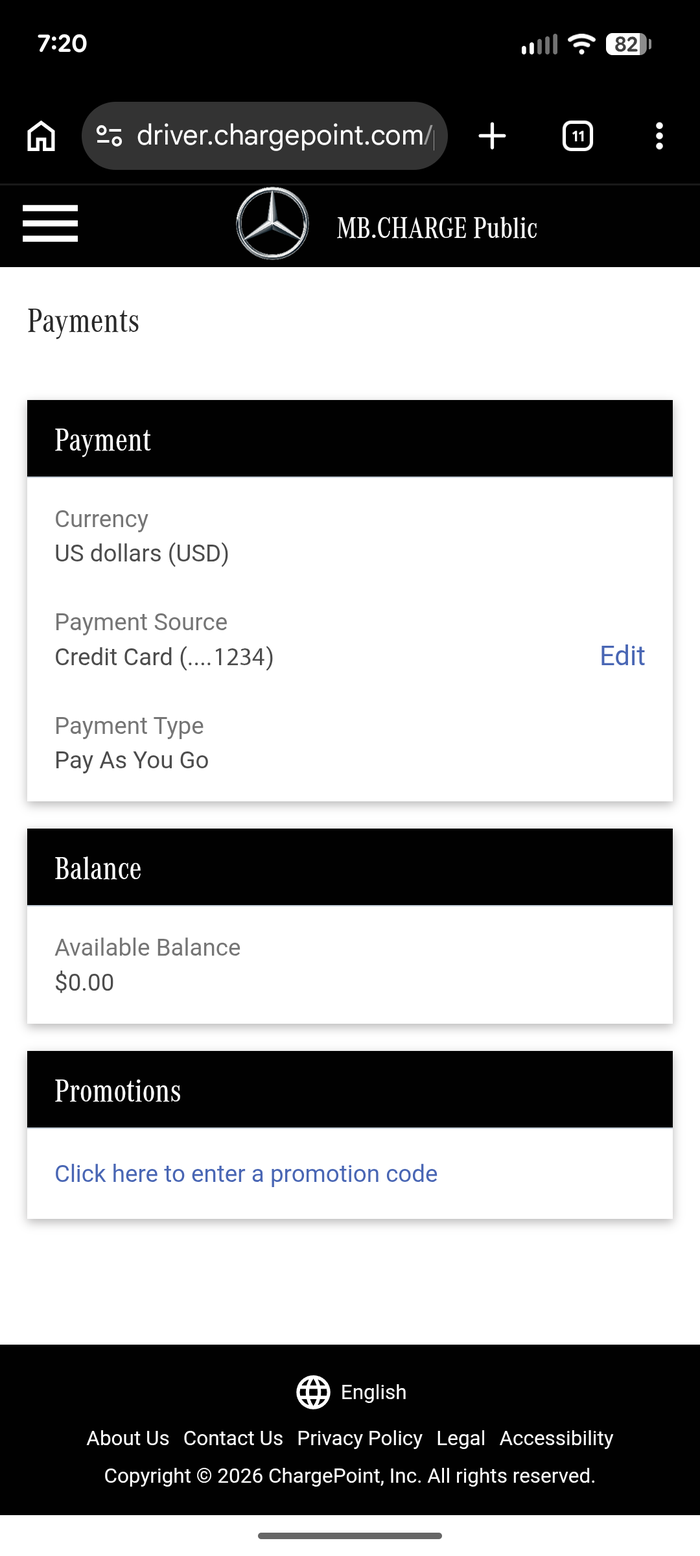
MB. CHARGE Public is backed by your ChargePoint® account, whether you created one at registration or paired an existing one. Without a valid payment, you will not be able to charge at stations in our network. Your account must have valid payment information to start charging sessions through MB.CHARGE Public.
1. Open the Mercedes-Benz app and scroll down to select “Manage contract”
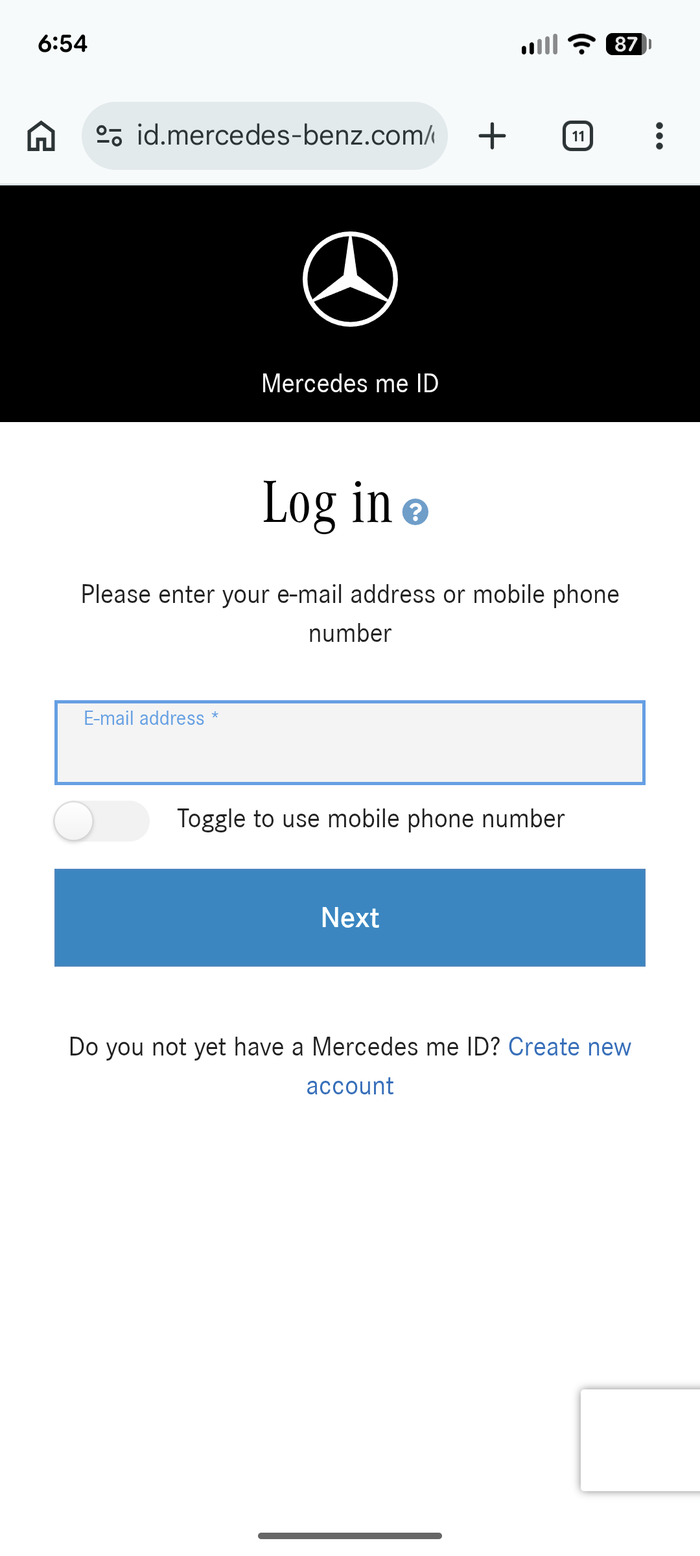
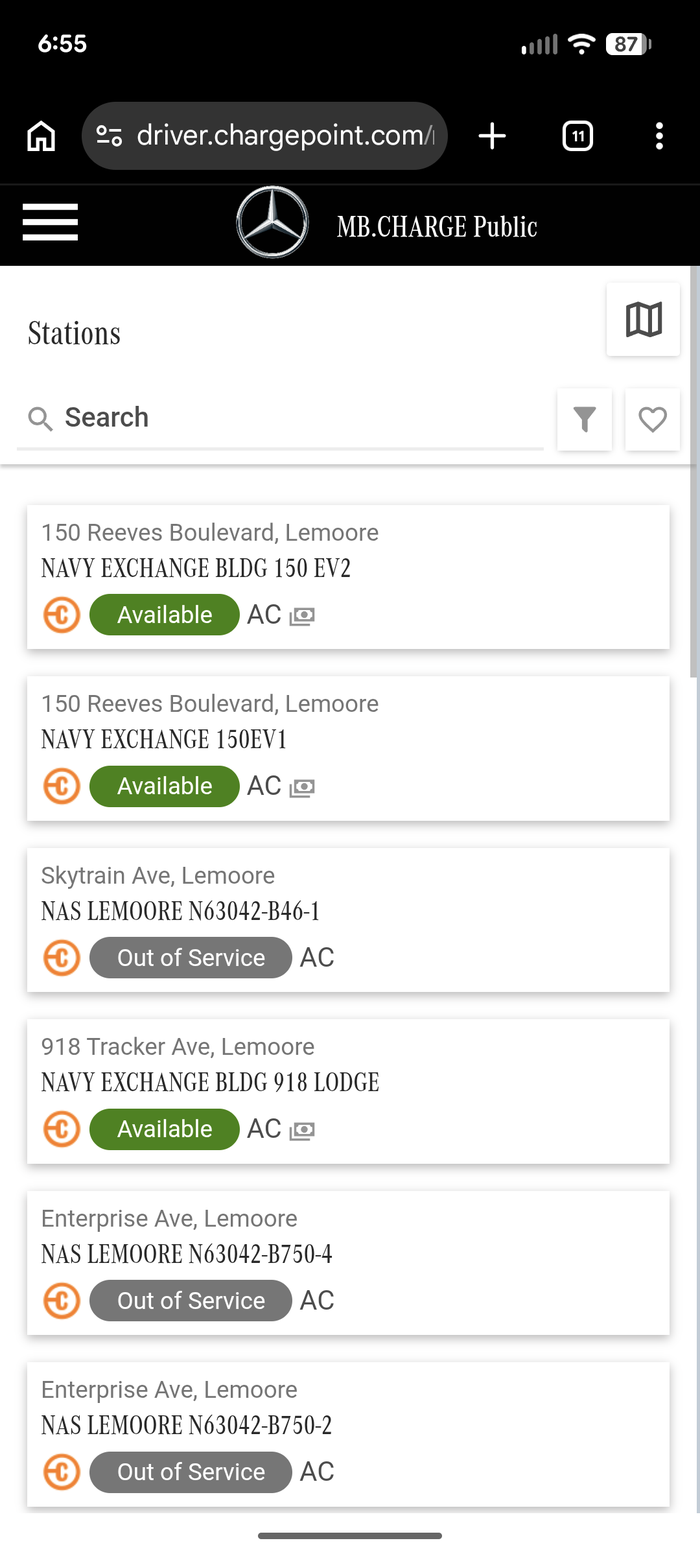
2.Select “MB.CHARGE Public charging contract,” which will open a link to the ChargePoint® account in your browser.
3. Log in to your account
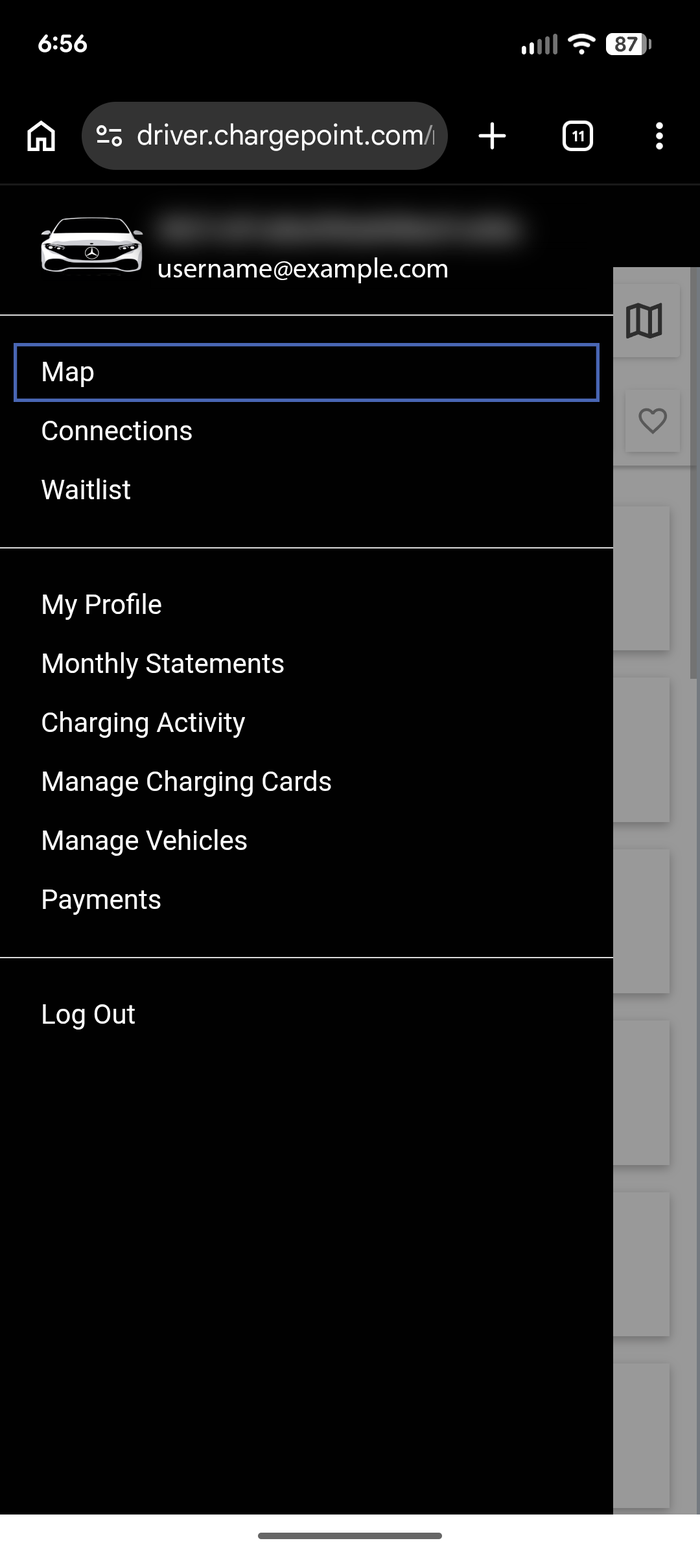
4. Once logged in, open the menu in the upper lefthand corner.
5.Select “Payments.”
6. Select "Edit" to review and update your payment source.
7. Finish by saving your new payment information.
How do I setup an MB.CHARGE Public account and add payment?
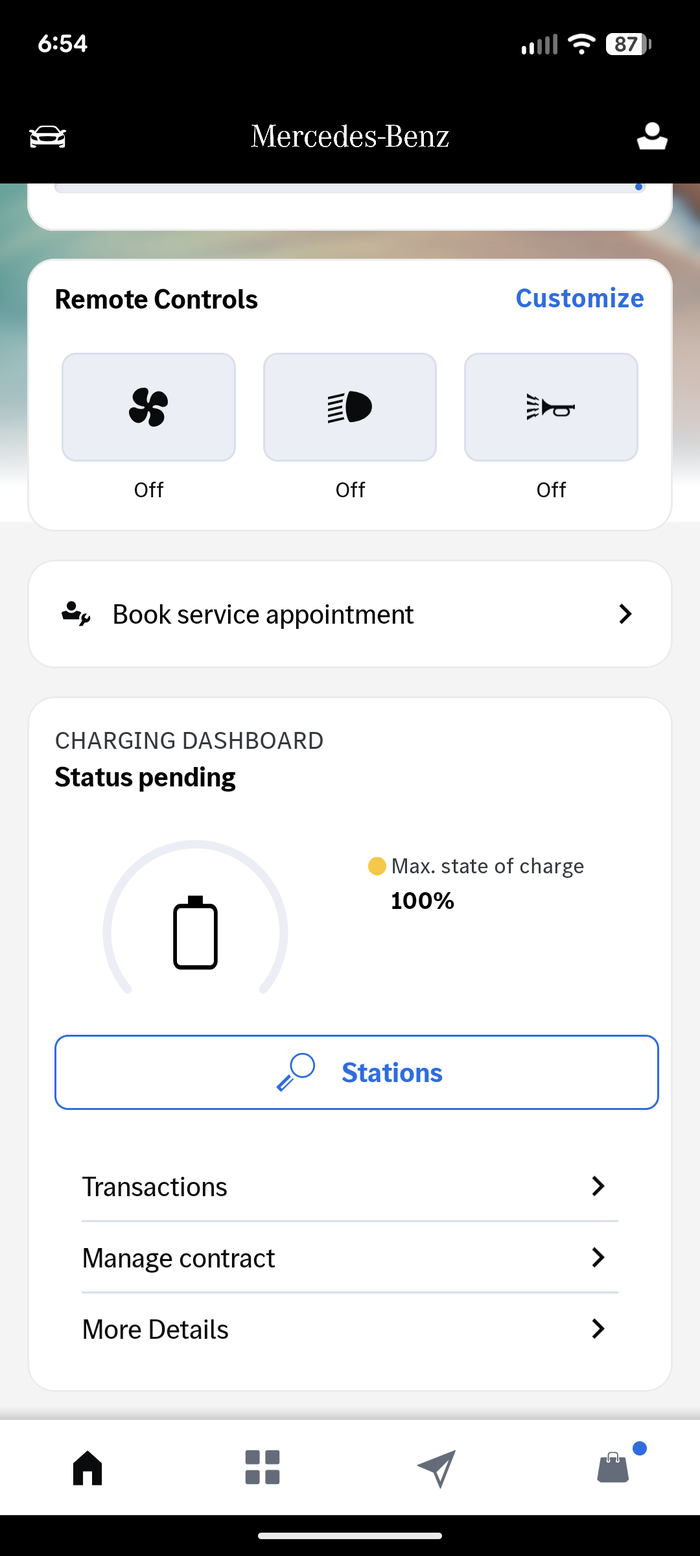
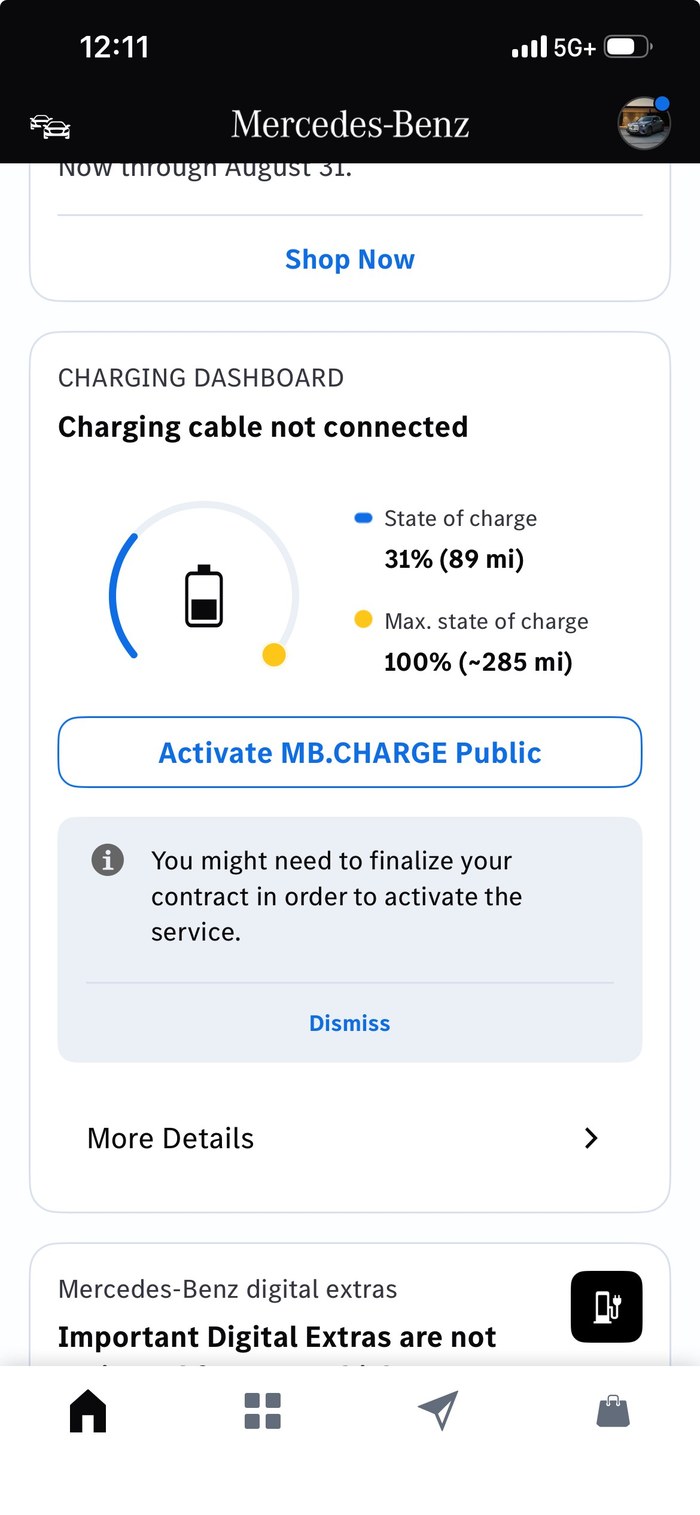
Login to your Mercedes-Benz app and scroll to your Charging Dashboard Click on “Activate MB.CHARGE Public” and follow the steps to activate your account and add a payment method to start a charging session and receive the discount.
How do I confirm I have an active MB.CHARGE Public account?
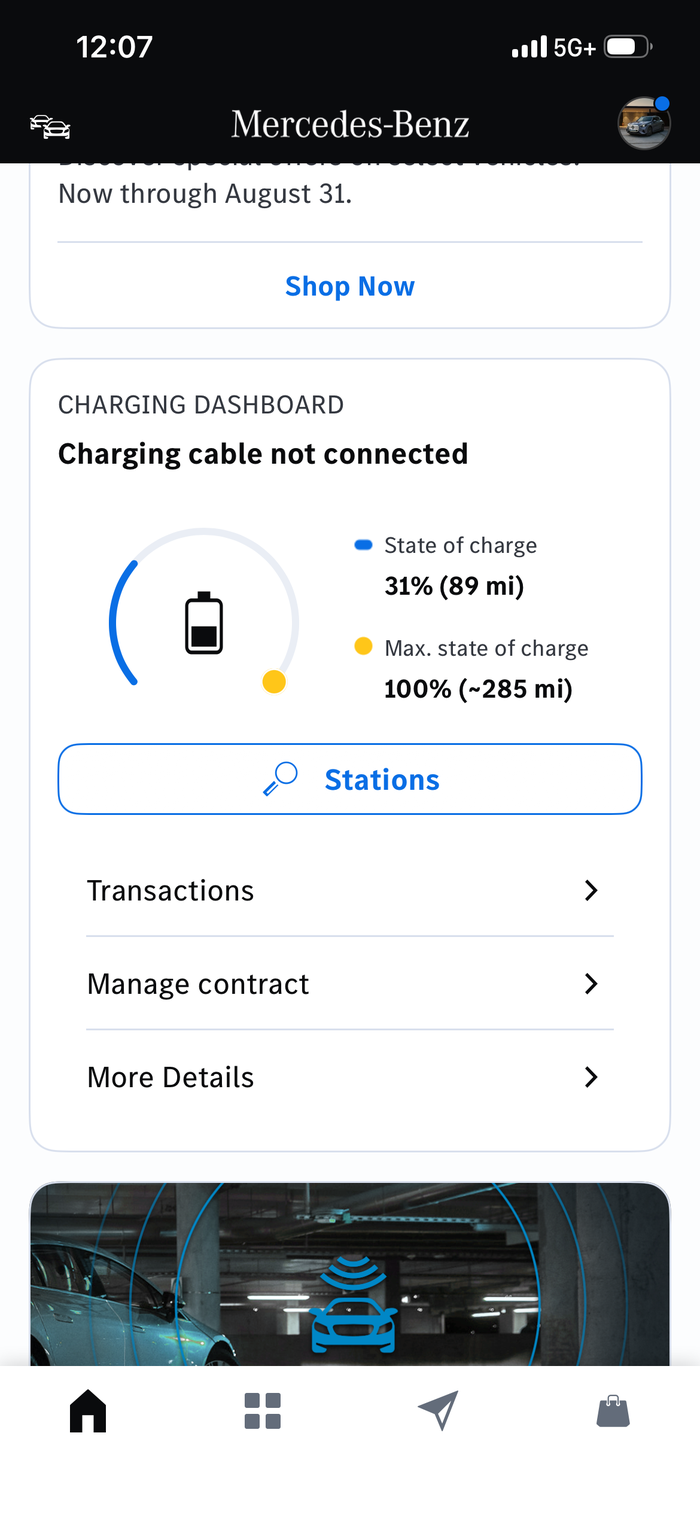
Login to your Mercedes-Benz app and scroll to your Charging Dashboard. If you see a button to search “Stations,” you have an active account. If you see a button that says “Activate MB.CHARGE Public”, then you need to click that button and follow the steps to activate your account and add a payment method to start a charging session and receive the discount.
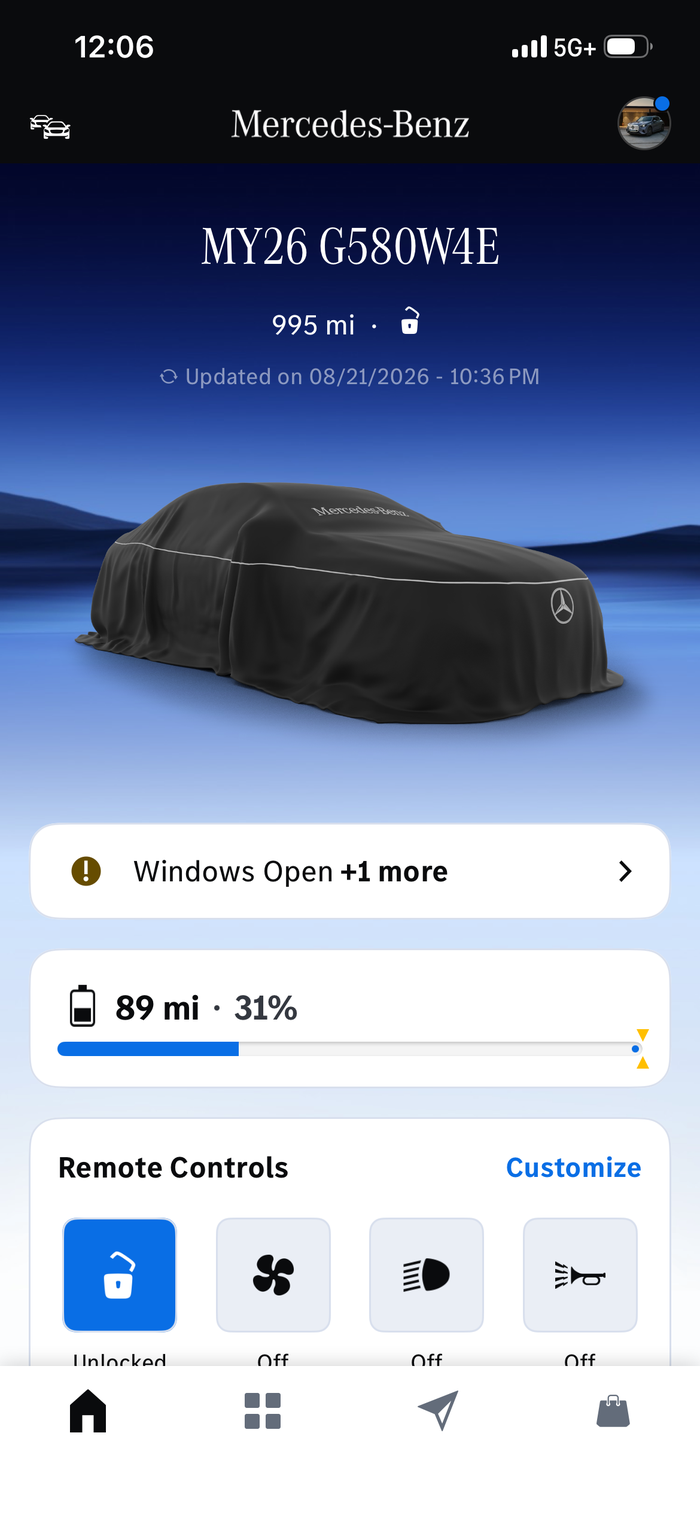
Home ScreenMB.CHARGE Public is ActiveMB.CHARGE Public is Inactive
For questions about your MB.CHARGE Public account, visit mbusa.com/charge
How do I receive the Mercedes-Benz discount?
For eligible EVs, simply charge at a participating IONNA station using either In-App Charging or Plug & Charge or the MBUX center display in the vehicle. The discount is applied automatically. A promotional code is not needed.
Model year 2025 & 2026 G580e and 2022 & 2023 EQB and GLE 450e are not compatible with Plug & Charge. Instead, use the Mercedes-Benz App or MBUX center display in the vehicle to start a session.
CLA electric vehicles only have access to Mercedes-Benz App and Plug and Charge.
Where can I view my Mercedes-Benz discount during my charging session?
After you unplug, press the Cost Detail button on the charger to view the amount your session was discounted.
The Final Cost shown on the charger screen and in your Mercedes-Benz app is the amount you'll pay — your discount and any applicable taxes have already been applied.
How much is the Mercedes-Benz discount?
Mercedes-Benz drivers who initiate charging with In-App Charging, Plug & Charge or the vehicle's MBUX center display will receive an automatic 10% discount on all charging sessions on the IONNA network. Applicable for sessions started via MB.CHARGE Public.
Where can I find my local rechargery to charge my Mercedes-Benz electric vehicle?
You can find IONNA Rechargeries to charge your Mercedes-Benz electric vehicles in your Mercedes-Benz App and the MBUX center display in your vehicle. You can also find us on Find a Rechargery
Is there a limit on how often I can charge to receive the Genesis discount?
No, there is no limit. You can charge as often as you like and receive the discount when you use In-App Charging or Plug & Charge.
Where can I view my Genesis discount during my charging session?
After you unplug, press the Cost Detail button on the charger to view the amount your session was discounted.
The Final Cost shown on the charger screen and in your MyHyundai or MyGenesis app is the amount you'll pay — your discount and any applicable taxes have already been applied.
Will the Genesis discount work if I use my credit card at the IONNA charger?
No. You must use In-App Charging or Plug & Charge to receive the discount.
Can I combine the Genesis discount with other discounts that IONNA might offer?
Yes. At times IONNA may offer holiday pricing promotions. In this case, the discount will be applied to the IONNA promotional pricing.
How do I receive the Genesis discount?
For eligible EVs, simply charge at a participating IONNA station using either In-App Charging or Plug & Charge. The discount is applied automatically. A promotional code is not needed.
What are the eligible Genesis vehicles and how do I know if it is equipped with In-App Charging or Plug & Charge?
Eligible EV models with both In-App Charging and Plug & Charge:
GV60 (2026 model year and newer)
Electrified GV70 (2026 model year and newer)
Is there a limit on how often I can charge to receive the Hyundai discount?
No, there is no limit. You can charge as often as you like and receive the discount when you use In-App Charging or Plug & Charge.
Can I combine the Hyundai discount with other discounts that IONNA might offer?
Yes. At times IONNA may offer holiday pricing promotions. In this case, the discount will be applied to the IONNA promotional pricing.
What are the eligible Hyundai vehicles and how do I know if it is equipped with In-App Charging or Plug & Charge?
Eligible EV models with both In-App Charging & Plug & Charge:
IONIQ 5 / 5 N (2025 model year and newer)
IONIQ 9 (2026 model year and newer)
EV models that have In-App Charging only
IONIQ 5 (2022-2024 model year)
IONIQ 6 (2023-2025 model year)
KONA Electric (2025 model year and newer)
In-App Charging will be available on additional models later this year.
Will the Hyundai discount work if I use my credit card at the IONNA charger?
No. You must use In-App Charging or Plug & Charge to receive the discount.
How do I receive the Hyundai discount?
For eligible EVs, simply charge at a participating IONNA station using either In-App Charging or Plug & Charge. The discount is applied automatically. A promotional code is not needed.
Where can I view my Hyundai discount during my charging session?
After you unplug, press the Cost Detail button on the charger to view the amount your session was discounted.
The Final Cost shown on the charger screen and in your MyHyundai or MyGenesis app is the amount you'll pay — your discount and any applicable taxes have already been applied.
How much is the Hyundai discount?
Eligible Hyundai and Genesis EV owners will receive a 10% charging discount on every charging session at all IONNA fast‑charging stations beginning Aug. 19, 2026.
Does Plug & Charge work for KIA vehicles?
Yes, Plug & Charge is available for 2025 and newer KIA EV6 and 2026 and newer KIA EV9 at IONNA Rechargeries nationwide.
Does Plug & Charge work for Volvo EX60 and EX90 vehicles?
Yes, Plug & Charge is available for Volvo EX60 and EX90* at IONNA Rechargeries nationwide. *2025 Volvo EX90 vehicles may require a free hardware upgrade from your dealership to use Plug & Charge.
Does the 10% discount apply to all BMW vehicles?
Yes, all BMW and MINI drivers who initiate charging with Plug & Charge or the My BMW App will receive 10% off charging sessions.
When are where can I view my BMW discount?
You can find your discounted price/kWh within the My BMW app before your begin your session as well as in the session summary. The dispenser screen will only reflect the discount in the final cost displayed on the screen.
I need help setting up my GM vehicle mobile app or Plug & Charge
Contact GM Support at 833-647-6937
What are the benefits of BMW owners using an IONNA Rechargery?
IONNA is seamlessly integrated into the BMW Charging Network ecosystem. This means through both the vehicle navigation system and My BMW app, customers can view all the information they need regarding IONNA Rechargeries, including location, live availability, reviews, and nearby amenities. After setting up an account in the My BMW app, drivers can also use Plug & Charge at IONNA Rechargeries. Plug & Charge enables drivers to simply plug in and walk away, no apps or interaction with the charger is needed.
How do I charge a BMW at IONNA?
BMW EVs from Model Year 2024 on can use the Plug & Charge function at IONNA. This means that no interaction with a credit card, the app or the charger Is required. Just plug In and walk away. To get set up, create an account with Shell Recharge within the My BMW app. Once completed, a Plug & Charge contract certificate will be automatically downloaded to the vehicle.
Can I use the ChargePoint App, ChargePoint Card, or ChargePoint Tap to Charge at IONNA?
You can start a charging session through the Chargepoint App. ChargePoint's "Tap to Charge" and the ChargePoint Card (RFID card) do not currently work at IONNA stations.
Does IONNA show up in my vehicles navigation system?
You can route to your closest IONNA station in BMW, Ford, General Motors, Hyundai, Kia, Mercedes, Porsche, Rivian, Stellantis and Toyota EVs.
Will Plug & Charge work at IONNA Rechargeries?
BMW, General Motors, Hyundai, Kia, Mercedes-Benz, Porsche, Rivian, Ford, and Volvo drivers can now use Plug & Charge! Be sure to check back regularly as we add capabilities for other partners.
Can I charge my Tesla at an IONNA Rechargery location?
Yes, IONNA Rechargery locations love to charge Tesla's and have NACS charging bays. However, Tesla models before 2021 may require an upgrade to be able to charge.
How can I pay for charging?
You can pay for EV charging at the charger with a credit card (tap, swipe, or insert), Apple Pay or Google Pay, or use Plug & Charge. If you would like to use an app, plenty are supported. See "What charging apps work at an IONNA Rechargery?" for the list.
Can I use my vehicles mobile app to pay?
You can use the following apps to pay for charging at your local IONNA Rechargery: ChargeHub, ChargePoint, EV Connect, Ford, Kia Access, Lexus, Mercedes Benz, MINI, My BMW, myCadillac, myChevrolet, myGMC, MyHyundai with Bluelink, My Porsche, Rivian, Stellantis Free2Move Charge, Toyota and Volvo Cars.
What charging apps work at an IONNA Rechargery?
You can use the following apps to start a remote charging session at your local IONNA Rechargery: ChargeHub, ChargePoint, EV Connect, Ford, Kia Access, Lexus, Mercedes Benz, MINI, My BMW, myCadillac, myChevrolet, myGMC, MyHyundai with Bluelink, My Porsche, Presto, Rivian, Stellantis Free2Move Charge, Toyota and Volvo Cars.
Are the IONNA Rechargeries open to everyone?
Yes. Every driver is welcome at IONNA Rechargeries, whatever you drive and whoever built it. Most dispensers have NACS and CCS connectors, so most EVs plug right in.
What connectors will you find at a Rechargery?
IONNA provides access to NACS & CCS across the network. We also support the use of adapters purchased from your dealer. Check your local Rechargery for details.
Where can I find my local rechargery?
You can always check this website at Find a Rechargery for the most up to date information on locations, including those that are coming soon! You can also find us by searching for "IONNA" on Plugshare, Google Maps, Apple Maps, ChargePoint, Presto, and more.
I’m having trouble with an IONNA dispenser.
Please use the feedback loop on the charger in question to let us know of any issue.